Every company we work with had a spreadsheet like yours. The production tracker with the formulas only one person understands. The quoting workbook that gets emailed around with _FINAL_v7 in the filename. The reconciliation sheet someone rebuilds every month from four exports.
Spreadsheets earn their place — they're how a resourceful team runs a growing company without an IT department. The problem isn't that you used them. The problem is the moment they stop being a tool your team uses and become the system your company runs on. That moment rarely announces itself. It shows up as symptoms.
Nine signs the spreadsheet is now running you
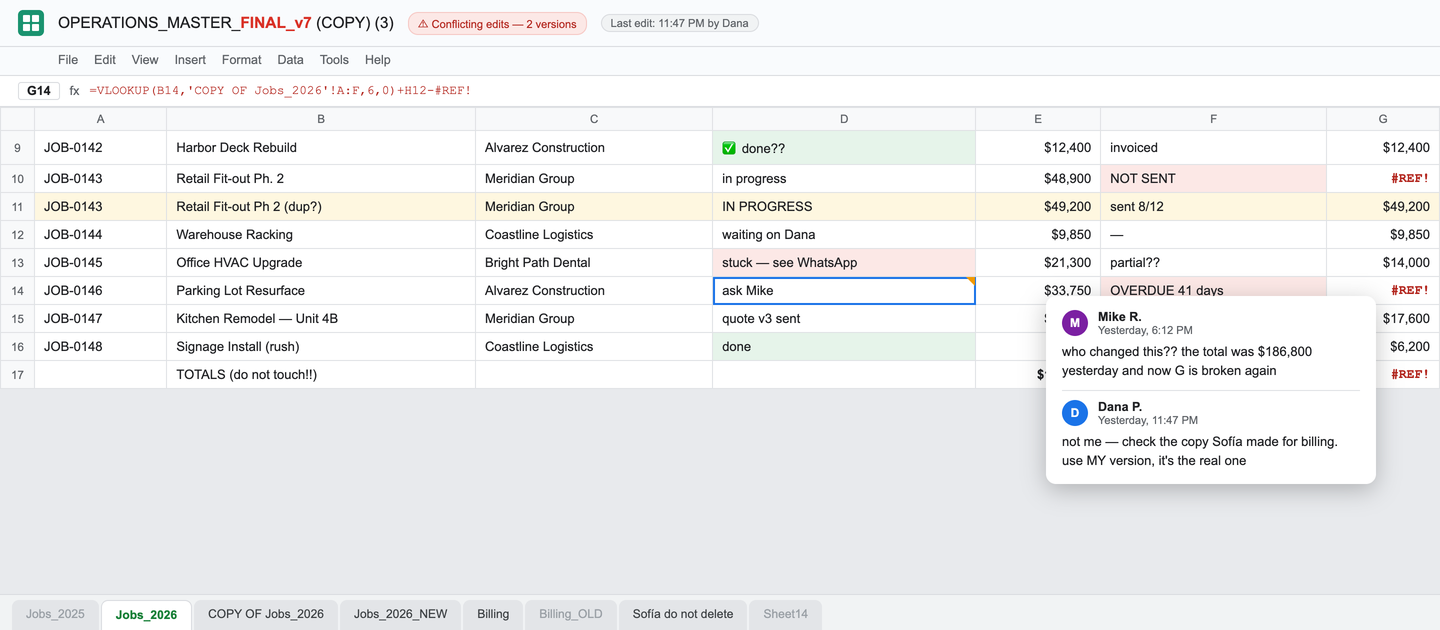
- Version conflicts are a weekly event. Two people edited two copies, and now someone is comparing rows to figure out which is real.
- One person understands the formulas. When they take a vacation, part of the company's brain goes with them.
- The same data gets typed more than once. From the form to the sheet, from the sheet to the invoice, from the invoice to the report — each hop a chance to get it wrong.
- Numbers need "cleaning" before every decision. The meeting can't start until someone reconciles the sheet against reality.
- One sheet became five that must agree — and don't. Sales has a copy, operations has a copy, and the owner has a third one that's "the real one."
- Status lives in a chat thread about the sheet. "Did row 40 ship?" is answered by scrolling WhatsApp, not by looking anywhere authoritative.
- Billing starts with copy-paste. Money leaves the building slower because invoicing means assembling numbers by hand.
- Errors surface downstream. The person who catches the mistake is a client, an auditor, or the bank — never the sheet.
- Every new hire adds a tab, not capacity. Growth is making coordination heavier instead of output bigger.
Three or more of these, on a sheet that several people touch, that runs a recurring process, and that feeds money decisions? You've outgrown it. Not because your team lacks discipline — because you're asking a calculator grid to be a database, a workflow engine, and an audit trail at once, and it was never built for any of those jobs.
Prefer to score yourself? Take the 2-minute Spreadsheet Checkup — the nine signs as yes/no questions, with an honest verdict at the end.
Manual work doesn't stay cheap
The spreadsheet feels free because the license costs nothing. What it actually costs is spread across payroll and mistakes, where it's harder to see:
- Payroll hours — retyping, reconciling, chasing versions. Hours a week per person, every week, forever.
- Errors — a wrong number in a quote, a missed row on an invoice, a client trust withdrawal you can't deposit back.
- Cash flow — billing that waits for a person to assemble it is billing that happens late.
- Key-person risk — process knowledge that lives in formulas and habits, not in a system anyone can operate.
- The owner as integration layer — you personally moving information between tools and people, which is the most expensive middleware on the market.
- Enterprise value — a company that runs on tribal spreadsheets is harder to scale, harder to hand off, and harder to sell.
The numbers get concrete fast. One of the systems we built for our own media company recovered about six hours a day per position that was going into inbox-and-lookup work. Another replaced a project-management subscription and removed roughly $20,000 a year in software spend — before counting the hours. That's the scale of money hiding inside "we manage it in a spreadsheet."
The three standard exits — and the fourth
Exit 1: buy another tool
Sometimes right. When your process is generic — email, accounting, payroll — generic software is exactly what you want, and we'll tell you so. But the spreadsheet you can't kill usually survives because it wraps the process that makes your company different. Generic tools force that process into their shape. You end up paying monthly, per seat, forever, for a 60% fit — with the missing 40% living in… a new spreadsheet next to the tool. (We lived this one ourselves — here's what replacing Monday.com actually looked like.)
Exit 2: hire a dev shop
Now you're writing a requirements document, approving mockups, and six months later receiving software that matches the spec but not the work — because the spec was written from memory in a conference room, not from watching the work happen. The quote was by the hour, so every correction is a change order.
Exit 3: do nothing and add a person
The most common one. It feels prudent and costs the most: a salary spent on being human glue, coordination that grows faster than output, and the same errors with more hands in them.
The fourth exit: build the system around the work
Watch the work actually happen. Take the one bottleneck that's bleeding the most. Turn it into working software on representative real-world data in 48 hours — not a proposal, not a wireframe, software your team can touch. Then grow the system from what's proven, and the client owns the code. That's how we work, because we're business owners who built our own systems first — more than 20 of them, running today.
Anatomy of a spreadsheet replacement
"Custom software" sounds abstract until you see what actually changes. When a spreadsheet becomes a system, five things happen:
- Rows become records. Data gets validated at the door — a date is a date, an amount is an amount, a required field can't be skipped. Bad data stops entering instead of getting cleaned later.
- Tribal formulas become explicit rules. The logic that lived in one person's head — and one fragile cell — becomes rules the system enforces for everyone, visibly.
- Everyone gets their own view. The operator sees their queue, the lead sees the board, the owner sees the numbers — one source of truth, no more five copies.
- History exists. Who changed what, when. Corrections leave a trace instead of overwriting the past.
- The re-typing ends. The system talks to the tools that stay — so information moves without a human ferrying it.
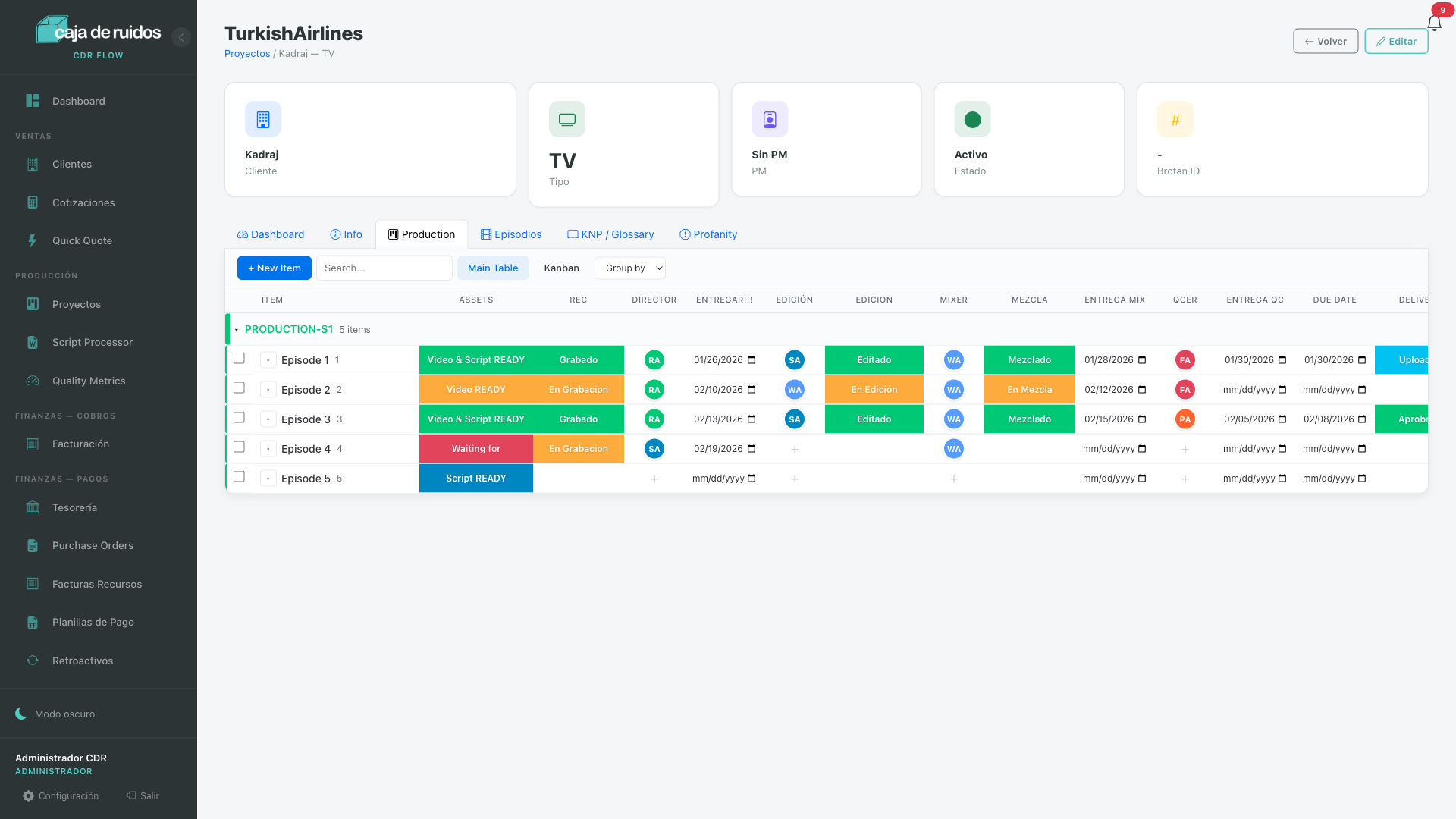
This isn't theory — it's the pattern across the systems in our portfolio:
- Tax Package — a year of statements from many banks becomes a reconciled ledger with a gate: opening + movements must equal closing to five cents before anything enters. 2,100 transactions, 15 human confirmations.
- Submit Portal — the film-tracking Google Sheet still exists, but now it updates itself from the delivery platform instead of being maintained by hand.
- Content Studio — a content library in a Drive spreadsheet became a production board with deadlines, QC and an audit trail the owner runs herself.
- CDR Flow — the production board that replaced a project-management subscription, three spreadsheets and a WhatsApp group at our own media company.
When the spreadsheet should stay
Not every sheet deserves replacing, and a partner who says otherwise is selling you software, not leverage. Keep the spreadsheet when:
- It's a one-off analysis or a model you're exploring — spreadsheets are unbeatable thinking tools.
- It has one author and no handoffs — a personal list doesn't need infrastructure.
- It's genuinely temporary — a sheet for one event that dies with the event.
Replace it when it's multi-person, recurring, and feeding money decisions. That's the line. A surprising amount of pain disappears when you only systematize what crosses it.
What it costs, and how we de-risk it
Start small, on purpose. The First Flow is $3,500, fixed: we spend half a day watching your team work, pick one expensive bottleneck, and turn it into working software on representative real-world data in 48 hours. It takes about three hours of your team's time. You keep the result either way — and the fee is credited toward the full build if you continue.
Full systems start at $15,000. You own the code — no per-seat pricing that grows with your headcount.
And one rule above all of it: if the math doesn't work, we shouldn't build it. A system has to defensibly return several times its cost — in removed subscriptions, recovered hours, faster billing, fewer errors — or we'll tell you to keep the spreadsheet. For the full breakdown of what drives price and how the four ways of paying compare, see our cost guide.
Questions owners actually ask
How do I know we've outgrown our spreadsheets?
Three questions: do several people touch it? Does it run a recurring process? Do its numbers feed money decisions? All three yes — plus version conflicts, hand reconciliation, or errors caught downstream — and the sheet has become a system of record for work it was never designed to run.
What does it cost?
$3,500 fixed to turn the first bottleneck into working software in 48 hours, credited toward a full build. Full systems start at $15,000, and you own the code. If the return isn't defensible, we'll say so before you spend anything.
How long until something works?
48 hours to the first working version, on representative real-world data, with about three hours of your team's time. The full system grows from that proven piece — not from a requirements document.
Will the team actually use it?
The system is built from watching how your team already works, so it matches the real workflow instead of imposing a new one. And nobody loses their outputs — your accountant still gets the Excel export, generated from validated data instead of assembled by hand.
Do we have to replace all our tools?
No. The tools that fit stay, and the system integrates with them. The target is the workflow that's uniquely yours — one bottleneck at a time, never a rip-and-replace.